On the box
What runs on the box, and as whom.
How you got here: Desktop app What a box needs 1. Create the controller key 2. Pair a box 3. Turn off root SSH login Exit codes The controller key Pairing and host keys Signed intents and receipts
Show previous steps 9
Install 1
- Desktop app
Download the desktop app for your OS and open it.
The macOS zip holds Jumpgate.app and Jumpgate Terminal.app; Windows has jumpgate-tray.exe and jumpgate.exe; Linux has install.sh. Every download carries both Linux agents.
Show image
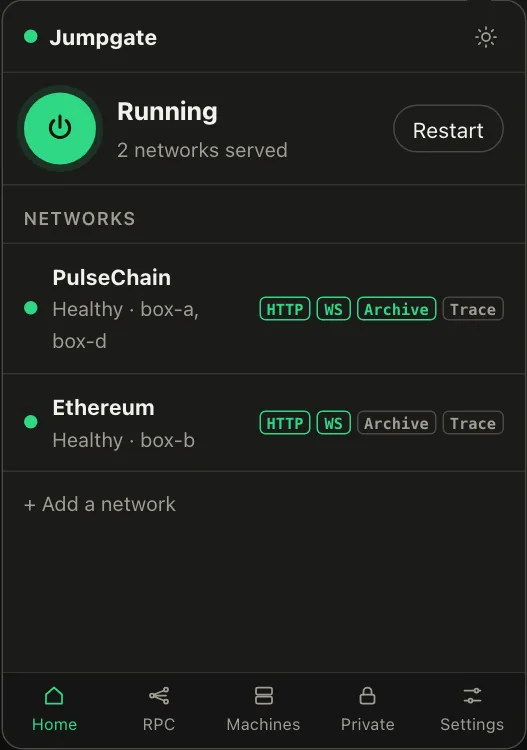
Illustration from the jumpgate.app demo, with made-up boxes; not a screenshot of the app.
Getting started 4
- What a box needs
A Debian or Ubuntu box with systemd, reachable as root over SSH.
Setup needs root (or passwordless sudo with --sudo) and checks Linux, systemd and disk first. The node itself runs as an unprivileged account.
- 1. Create the controller key
Create the key that signs every command to your boxes.
jumpgate keys init stores it in the Keychain, Credential Manager, Secret Service, 1Password or an owner-only file. It never leaves your computer.
Show image
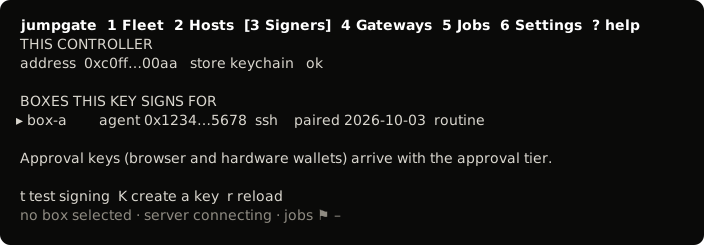
The TUI, from its test snapshot; empty rows removed. - 2. Pair a box
Install the agent on a box and confirm its host key.
You confirmed the box's fingerprint, and jumpgate installed jumpgate-agent.service and a restricted tunnel user. The box now takes only signed commands.
Show image
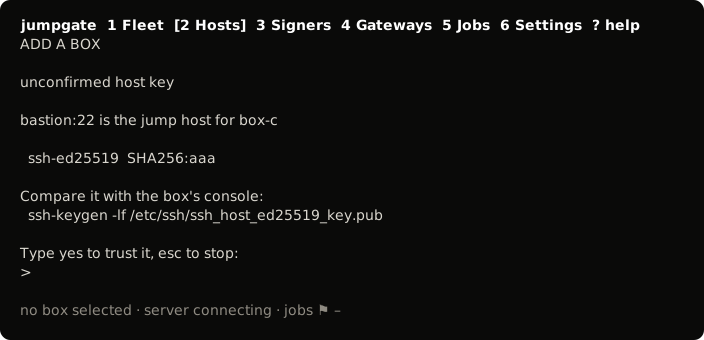
The TUI, from its test snapshot; empty rows removed. - 3. Turn off root SSH login
Close root SSH once the box is paired.
Set PermitRootLogin no. You only need root again to repair the agent.
Commands 1
- Exit codes
What each exit code means.
1 failed or refused, 2 bad usage, 3 unreachable, 4 a security failure such as an unconfirmed or changed host key.
Security 3
- The controller key
Where the signing key lives, and how to check it.
The key stays in your OS key store or 1Password; jumpgate keys show flags a key that is not the one on record.
Show image
The TUI, from its test snapshot; empty rows removed. - Pairing and host keys
Host keys are confirmed once and never learned again.
A changed key on a paired or confirmed box is refused, not re-learned.
Show image
The TUI, from its test snapshot; empty rows removed. - Signed intents and receipts
Every command is signed, and so is every answer.
The agent checks each signed intent against its policy and signs a receipt the controller verifies; a failure exits with code 4.
- The node services run as an unprivileged system account under hardened systemd units (
NoNewPrivileges,ProtectSystem=strictwith the data directory carved out, private/tmpand devices). - The firewall checklist only suggests commands. Jumpgate never runs them for you.
- The node's RPC binds to loopback by default. You can bind it to a trusted overlay address such as a Tailscale IP. The RPC is unauthenticated, so never bind it to a public address.